How to Host the Ultimate Bingo Night: The Complete Encyclopedia
Chapter 1: The Evolution of a Global Phenomenon
There is a vast difference between a chaotic, frustrating game night and a professionally hosted event. We have all been there: trying to run a game of Bingo, Tambola, or Housie using a rusty metal cage, losing numbered balls under the sofa, or struggling with free websites that are loaded with pop-up ads and laggy connections.
To truly host the ultimate Bingo night, you must first understand the game you are hosting. Bingo is not just a game; it is a global cultural phenomenon that dates back to 1530 in Italy, originally known as "Il Giuoco del Lotto d'Italia." It migrated to France, where it was adopted by the aristocracy, and eventually reached North America in the 1920s as a carnival game called "Beano." It was famously renamed "Bingo" when a toy salesman named Edwin S. Lowe heard an excited player accidentally yell "Bingo!" instead of "Beano."
Meanwhile, the game evolved entirely differently across the British Empire, transforming into what the UK, India, and Australia know today as Tambola or Housie. Whether you are organizing a massive charity fundraiser, a senior community center event, or an intimate family gathering in your living room, the key to success is preparation. This guide is the definitive, encyclopedic masterclass on the rules, the mathematical strategies, the historical lingo, and the modern software required to turn your TV into a spectacular live game show.
Chapter 2: Understanding the Variants (75-Ball vs. 90-Ball)
Before you invite guests and print cards, you must decide which variant of the game you are playing. The rules, the pace, the mathematical odds, and the physical cards are entirely different depending on geographic tradition. You cannot mix 75-ball cards with a 90-ball caller machine.
The 75-Ball Game (The North American Standard)
This is the fast-paced, highly visual version of the game predominantly played in the United States and Canada.
- The Card Layout: The ticket is a 5x5 square grid containing 24 numbers and one "FREE" space in the direct center.
- Number Distribution: The numbers are strictly grouped by the letters B-I-N-G-O.
- B: Numbers 1 through 15
- I: Numbers 16 through 30
- N: Numbers 31 through 45 (contains 4 numbers and the free space)
- G: Numbers 46 through 60
- O: Numbers 61 through 75
- Winning Patterns: Unlike 90-ball, 75-ball bingo relies heavily on geometric shapes. Players win by daubing numbers that create specific patterns on their 5x5 grid. Common patterns include a horizontal, vertical, or diagonal line; "Four Corners"; a "Postage Stamp" (the outer edge); an "X"; or a "Blackout" (covering every single square). You can explore endless variations on our Winning Patterns Guide.
The 90-Ball Game (Tambola / Housie / European Bingo)
This version is deeply ingrained in the culture of the UK, Australia, New Zealand, and India (where it is primarily known as Tambola). It is a longer, more suspenseful game that builds up to a grand finale.
- The Ticket Layout: The ticket is rectangular, featuring 3 horizontal rows and 9 vertical columns. Each row contains exactly 5 numbers and 4 blank spaces. Therefore, each ticket has exactly 15 numbers.
- Number Distribution: The numbers 1 through 90 are distributed across the 9 columns by tens:
- Column 1: 1-9
- Column 2: 10-19
- Column 3: 20-29
- ...up to Column 9: 80-90
- Winning Conditions: 90-ball games are almost always played in three distinct, sequential stages on the same ticket:
- Any 1 Line (Top, Middle, or Bottom): The first player to cover all 5 numbers in any single horizontal row.
- Any 2 Lines: The first player to cover all 10 numbers across any two horizontal rows.
- Full House (Blackout): The grand prize goes to the first player to cover all 15 numbers on their ticket.
The 80-Ball Game (Shutter Bingo)
A hybrid often found in modern online casinos. It uses a 4x4 grid (16 numbers) and is color-coded by column (Red: 1-20, Yellow: 21-40, Blue: 41-60, Silver: 61-80). It plays similarly to 75-ball with pattern matching but is specifically designed for faster digital play.
Chapter 3: The Mathematics and Strategy of Bingo
Is Bingo a game of pure, unadulterated luck? Mostly, yes. The drawing of balls is entirely random. However, over the past century, mathematicians, statisticians, and stock market analysts have spent decades trying to optimize the odds of selecting a winning card before the game even begins. If you want to impress your guests, or increase your own odds during a charity event, you need to understand the two most famous theories in Bingo mathematics.
The Granville Theory (The Uniform Distribution Model)
Joseph E. Granville was a famous financial writer and stock market analyst. He believed that the randomness of a Bingo machine actually leads to a predictable, uniform distribution over time. According to the laws of probability, in a game of 75-ball bingo, there should eventually be an equal number of odd and even balls drawn, an equal number of high and low balls, and an equal distribution of ending digits.
Therefore, Granville theorized that the "perfect" Bingo card should reflect this uniform distribution. When selecting your cards, you should look for:
- An equal balance of High numbers (38-75) and Low numbers (1-37).
- An equal balance of Odd numbers and Even numbers.
- An equal distribution of ending digits. For example, your card shouldn't have five numbers that all end in the digit "4" (e.g., 4, 14, 24, 34, 44). You want a card with a healthy mix of numbers ending in 1, 2, 3, 4, 5, 6, 7, 8, and 9.
By picking a card with a balanced distribution, Granville argued you increase your odds of matching the naturally balancing, uniform draws of the machine over a long session.
The Tippett Theory (The Median Clustering Model)
L.H.C. Tippett, a prominent British statistician, took a different approach. He looked at the length of the game to determine strategy. In a 75-ball game, the exact median number is 38. Tippett's theory revolves around the concept of statistical gravity toward the median over time.
- Short Games (The Extremes): If you are playing a quick game that requires very few numbers to win (like a simple horizontal line or "Four Corners"), the balls drawn are less likely to average out. Therefore, they are statistically more likely to fall closer to the extremes of the spectrum (closer to 1 and closer to 75). If playing a short game, choose a card heavily weighted with numbers like 1-15 and 60-75.
- Long Games (The Median): If you are playing a long, complex game (like a "Layer Cake" pattern or a full "Blackout"), more balls will be drawn. As more balls are drawn, the average of those balls will inevitably gravitate toward the median of 38. Therefore, for long games, you should pick a card where the majority of numbers are clustered around the middle (e.g., 20 through 50).
While no mathematical system can guarantee a win in a game of independent random events, combining Granville's uniform ending digits with Tippett's game-length median strategy is the most mathematically sound approach to selecting a card.
Chapter 4: The Ultimate Dictionary of Bingo Calls (1-90)
If you are playing 90-Ball Tambola or Housie, the game is heavily reliant on the caller. In the mid-20th century, London bingo halls were massive, crowded, and loud. To ensure numbers were heard clearly over the din, and to add entertainment value, callers developed "Bingo Lingo"—a system of rhymes, puns, and historical references.
To be an ultimate host, you shouldn't just call "Number 8." You call "Garden Gate, Number 8!" Here is the complete, definitive dictionary of all 90 traditional calls.
| Number | Traditional Call | Meaning / Origin |
|---|---|---|
| 1 | Kelly's Eye | Military slang, or a reference to Ned Kelly. |
| 2 | One Little Duck | The number 2 resembles the shape of a duck. |
| 3 | Cup of Tea | Classic Cockney rhyming slang. |
| 4 | Knock at the Door | Rhyming slang. |
| 5 | Man Alive | Rhyming slang. |
| 6 | Tom Mix | Rhyming slang for the famous early Western film star. |
| 7 | Lucky Seven | Universally considered a lucky number. |
| 8 | Garden Gate | Rhyming slang. |
| 9 | Doctor's Orders | Historically, a military doctor's prescription pill was known as "Number 9". |
| 10 | Boris's Den | Reference to 10 Downing Street (the UK Prime Minister's residence). |
| 11 | Legs Eleven | The two 1s resemble a pair of long legs. |
| 12 | One Dozen | Exactly twelve. |
| 13 | Unlucky for Some | The universally superstitious number. |
| 14 | Valentine's Day | February 14th. |
| 15 | Young and Keen | Rhyming slang. |
| 16 | Sweet Sixteen | A cultural milestone age. |
| 17 | Dancing Queen | A reference to the famous ABBA song lyrics. |
| 18 | Coming of Age | The legal age of adulthood in many countries. |
| 19 | Goodbye Teens | The final teenage year. |
| 20 | One Score | A "score" is 20. |
| 21 | Key of the Door | Historically, the age you received the key to the family home. |
| 22 | Two Little Ducks | Two 2s next to each other. |
| 23 | Thee and Me | Rhyming slang. |
| 24 | Two Dozen | Exactly 24. |
| 25 | Duck and Dive | Rhyming slang. |
| 26 | Pick and Mix | Rhyming slang. |
| 27 | Gateway to Heaven | Rhyming slang. |
| 28 | In a State | Rhyming slang for 28. |
| 29 | Rise and Shine | Rhyming slang. |
| 30 | Dirty Gertie | A famous WWII song "Dirty Gertie from Bizerte". |
| 31 | Get Up and Run | Rhyming slang. |
| 32 | Buckle My Shoe | Rhyming slang. |
| 33 | All the Threes | Literal visual description. |
| 34 | Ask for More | Rhyming slang. |
| 35 | Jump and Jive | Rhyming slang. |
| 36 | Three Dozen | Exactly 36. |
| 37 | More than Eleven | Rhyming slang. |
| 38 | Christmas Cake | Rhyming slang. |
| 39 | Steps | Reference to the famous Alfred Hitchcock film "The 39 Steps". |
| 40 | Life Begins | "Life begins at 40." |
| 41 | Time for Fun | Rhyming slang. |
| 42 | Winnie the Pooh | Rhyming slang. |
| 43 | Down on Your Knees | Rhyming slang. |
| 44 | Droopy Drawers | A visual gag; the 4s look like sagging pants. |
| 45 | Halfway There | Halfway to 90. |
| 46 | Up to Tricks | Rhyming slang. |
| 47 | Four and Seven | Literal description. |
| 48 | Four Dozen | Exactly 48. |
| 49 | PC | Reference to the old UK Police Constable identification numbers. |
| 50 | Half a Century | Fifty years. |
| 51 | Tweak of the Thumb | Rhyming slang. |
| 52 | Danny La Rue | Rhyming slang honoring the famous British entertainer. |
| 53 | Stuck in the Tree | Rhyming slang. |
| 54 | Clean the Floor | Rhyming slang. |
| 55 | Snakes Alive | Visual gag; the 5s look like rearing snakes. |
| 56 | Shotts Bus | A specific, historic UK bus route number. |
| 57 | Heinz Varieties | Reference to the famous "Heinz 57" slogan. |
| 58 | Make Them Wait | Rhyming slang. |
| 59 | Brighton Line | Reference to the London-to-Brighton train line. |
| 60 | Five Dozen | Exactly 60. |
| 61 | Baker's Bun | Rhyming slang. |
| 62 | Turn the Screw | Rhyming slang. |
| 63 | Tickle Me | Rhyming slang. |
| 64 | Red Raw | Rhyming slang. |
| 65 | Old Age Pension | The traditional retirement age in the UK. |
| 66 | Clickety Click | Rhyming slang, mimicking the sound of a train. |
| 67 | Stairway to Heaven | Rhyming slang. |
| 68 | Saving Grace | Rhyming slang. |
| 69 | Either Way Up | The number looks the same upside down. |
| 70 | Three Score and Ten | Biblical lifespan reference (20x3 + 10). |
| 71 | Bang on the Drum | Rhyming slang. |
| 72 | Six Dozen | Exactly 72. |
| 73 | Queen Bee | Rhyming slang. |
| 74 | Hit the Floor | Rhyming slang. |
| 75 | Strive and Strive | Rhyming slang. |
| 76 | Trombones | Reference to the song "76 Trombones" from The Music Man. |
| 77 | Sunset Strip | Reference to the classic TV show "77 Sunset Strip". |
| 78 | 39 More Steps | Rhyming slang/math joke. |
| 79 | One More Time | Rhyming slang. |
| 80 | Eight and Blank | Literal description. |
| 81 | Stop and Run | Rhyming slang. |
| 82 | Straight On Through | Rhyming slang. |
| 83 | Time for Tea | Rhyming slang. |
| 84 | Seven Dozen | Exactly 84. |
| 85 | Staying Alive | Rhyming slang. |
| 86 | Between the Sticks | Rhyming slang. |
| 87 | Torquay in Heaven | Rhyming slang. |
| 88 | Two Fat Ladies | Visual gag; the 8s resemble two large, curvy figures sitting next to each other. |
| 89 | Nearly There | Almost at 90. |
| 90 | Top of the Shop | The absolute highest number in the game. |
5. Step-by-Step Hosting Guide (The Pro Workflow)
Now that you know the math, the rules, and the language, it's time to set up the game. You could buy expensive paper pads and a plastic cage, but in 2026, the best hosts run their games entirely digitally. We have built a suite of free web tools at Bingo.surf to help you, as well as a premium app for the ultimate TV experience.
Step A: Generating the Cards
You can't play without tickets. If you want physical paper, use our Free Bingo Card Generator to instantly generate and print hundreds of unique, randomized 75-Ball or 90-Ball cards for your guests.
Step B: Declaring the Winning Patterns
Before the round begins, you must announce exactly what it takes to win. Are you playing for a simple "Straight Line" or a complex "Layer Cake"? Use our Bingo Patterns Guide so players know exactly what they need to daub to win.
Step C: The Calling Phase
As the host, your most important job is pacing. You need to call numbers loudly, clearly, and at a steady interval (usually 3 to 10 seconds between numbers). If you are hosting a quick, casual game on your laptop, you can use our free web-based Manual Number Caller.
To prevent cheating, you must keep a flawless record of every number called. Our digital Mastersheet handles this history for you automatically.
The "Pro" Upgrade: Host Like a Casino
Free web tools are great, but they rely on an active internet connection and can easily be ruined by a dropped Wi-Fi signal. If you want to eliminate stress, automate the math, and provide an unforgettable Game Show experience on your big screen, you need professional software.
Meet Bingo Caller Pro. At a price point of just $1.99, this Android app is cheaper than a single bag of chips, yet it provides a 100% offline, ad-free, casino-grade hosting suite that fits right in your pocket.
Download App on Google Play6. Why Upgrade to Bingo Caller Pro?
Here is exactly why Bingo Caller Pro is the industry standard for home gaming, community centers, and large-scale fundraisers.
The Dual-Screen "TV Mode" Experience
This is the killer feature. Most apps clutter the screen with buttons, making it hard for players to see the board. Bingo Caller Pro features an intelligent Projector/TV Mode.
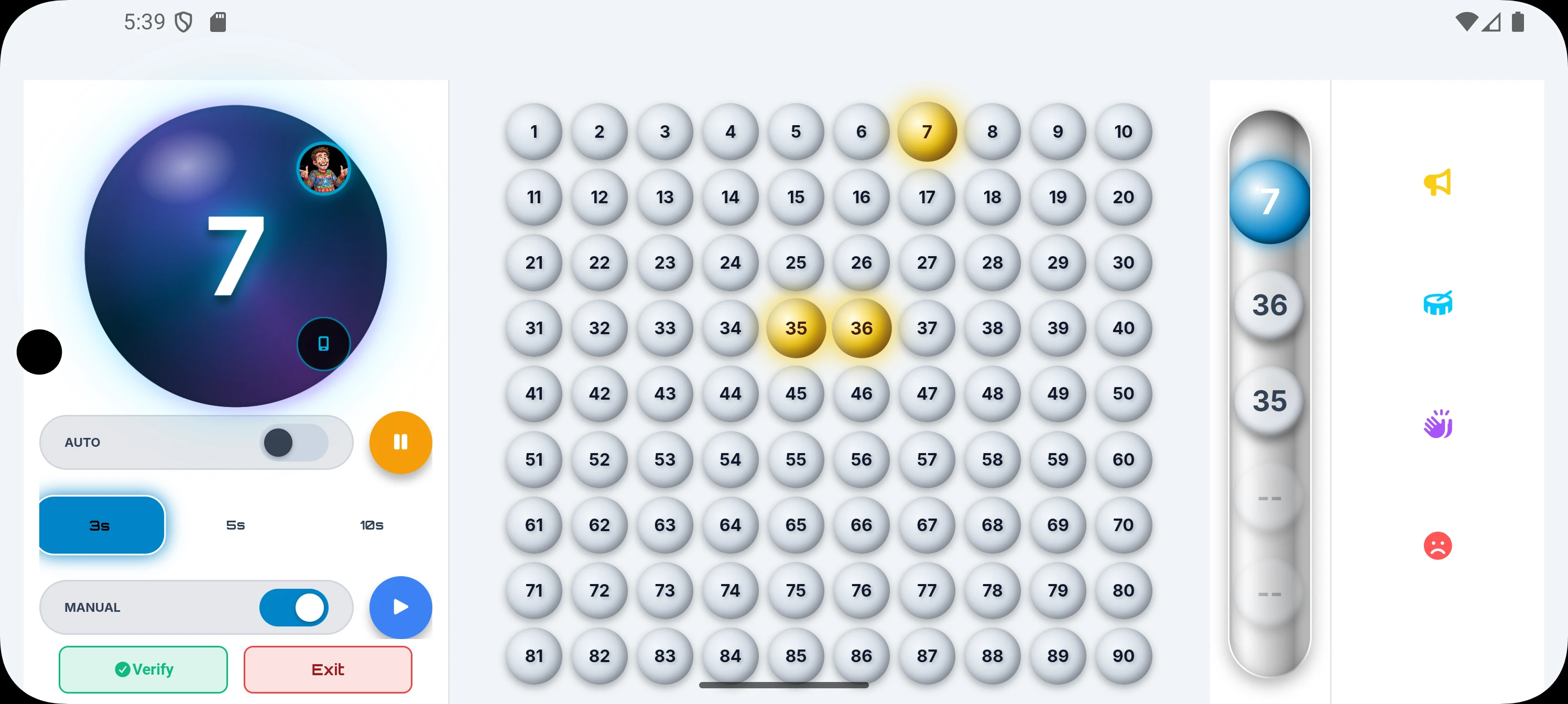
Simply connect your Android phone to your TV (via Chromecast or HDMI). The app automatically splits the interface:
- Your Phone: Becomes the master remote control. You see the manual controls, history, and host settings.
- The TV: Displays a clean, massive Bingo Board in high definition. When a number is called, users see a stunning 3D ball drop animation. It looks like a high-budget game show!
Fully Automated Calling & Multilingual Personas
If you don't want to shout numbers all night, the app acts as your Master of Ceremonies. You can set the Auto-Call Speed to 3s, 5s, or 10s intervals.
Even better, it features robust Voice Personas. It natively supports fluent voice calling in English, Spanish, French, German, Japanese, Hindi, and more. You can switch between calm announcers like "Zen Master" or high-energy comedic personas like "Rapidfire Ryan" and "Captain Confused."
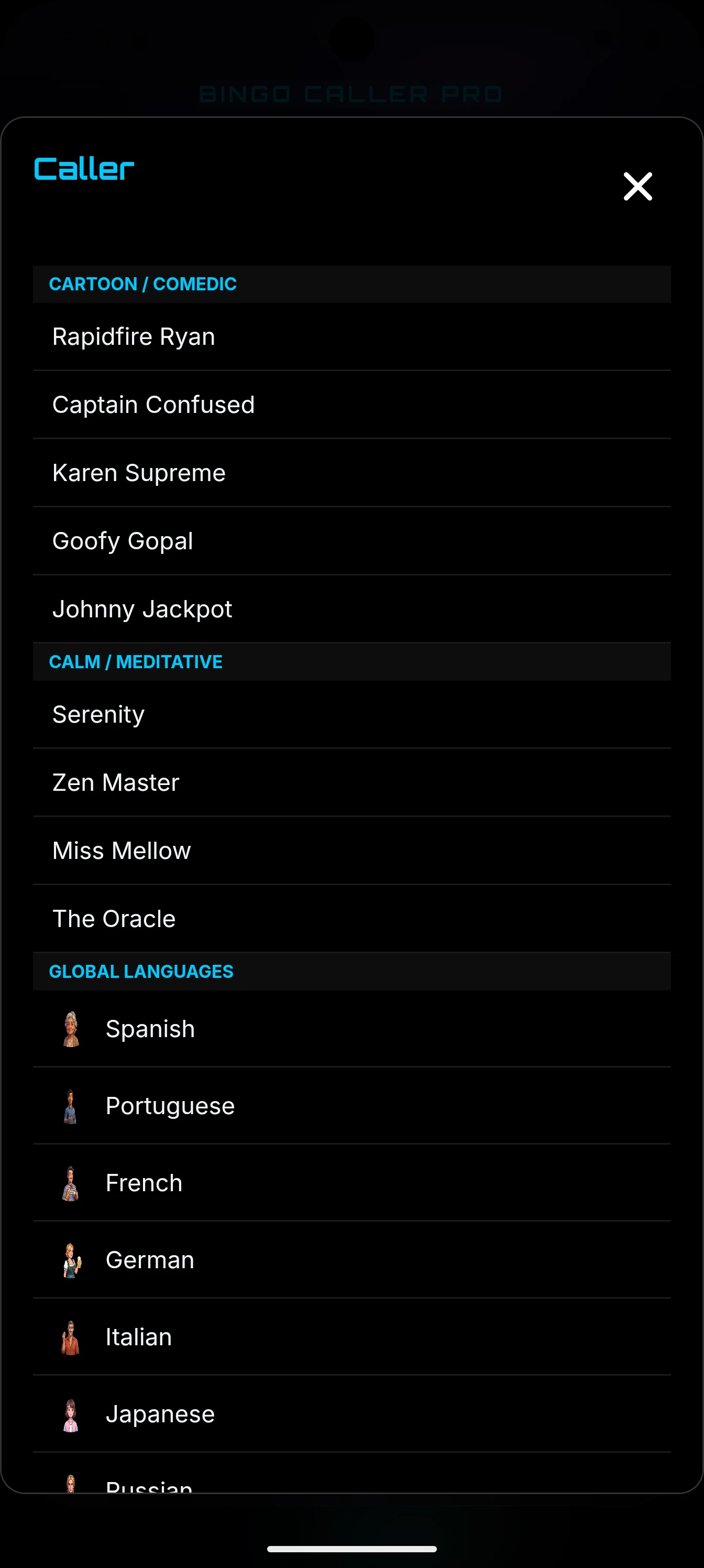
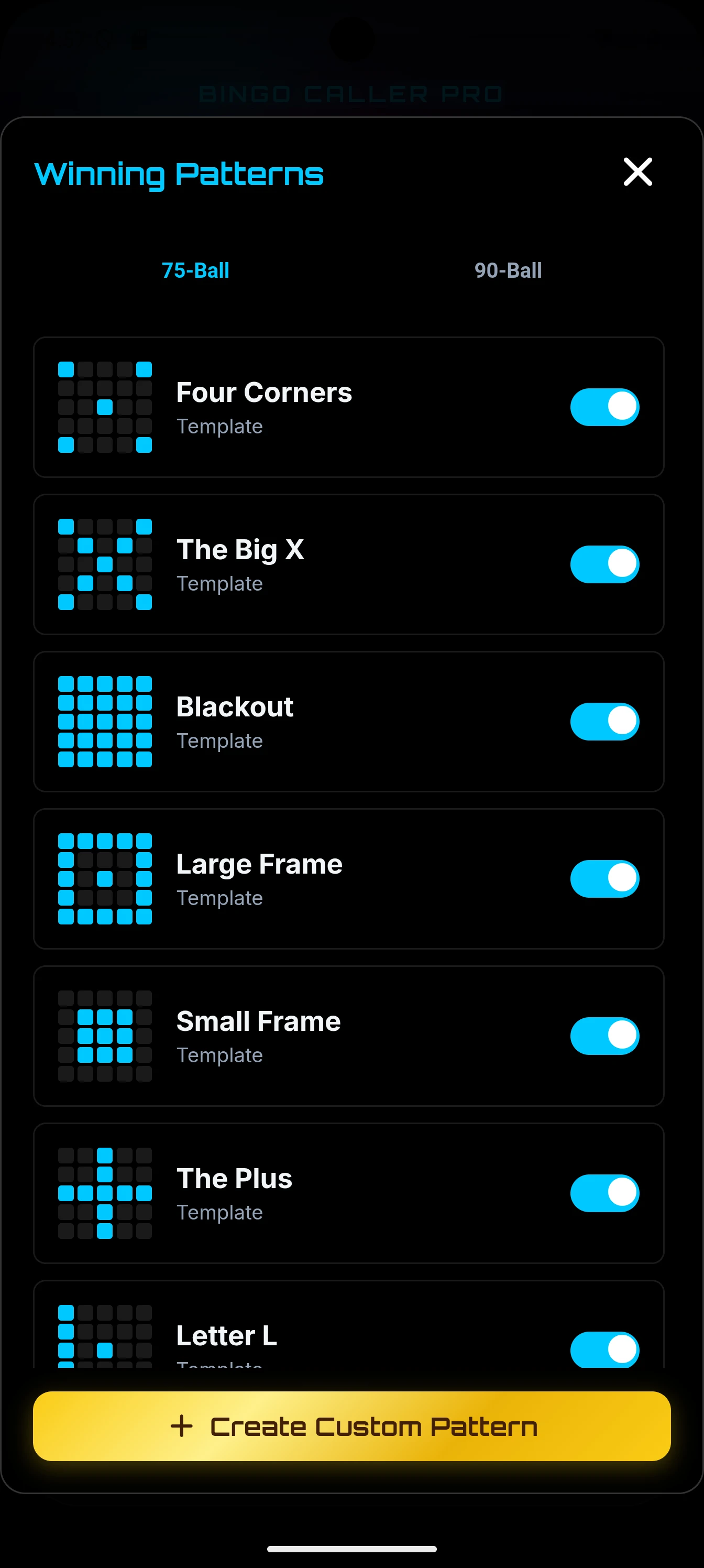
Switch voices and use the visual Grid Editor to create custom winning shapes instantly.
Digital Cards & Instant Anti-Cheat Verification
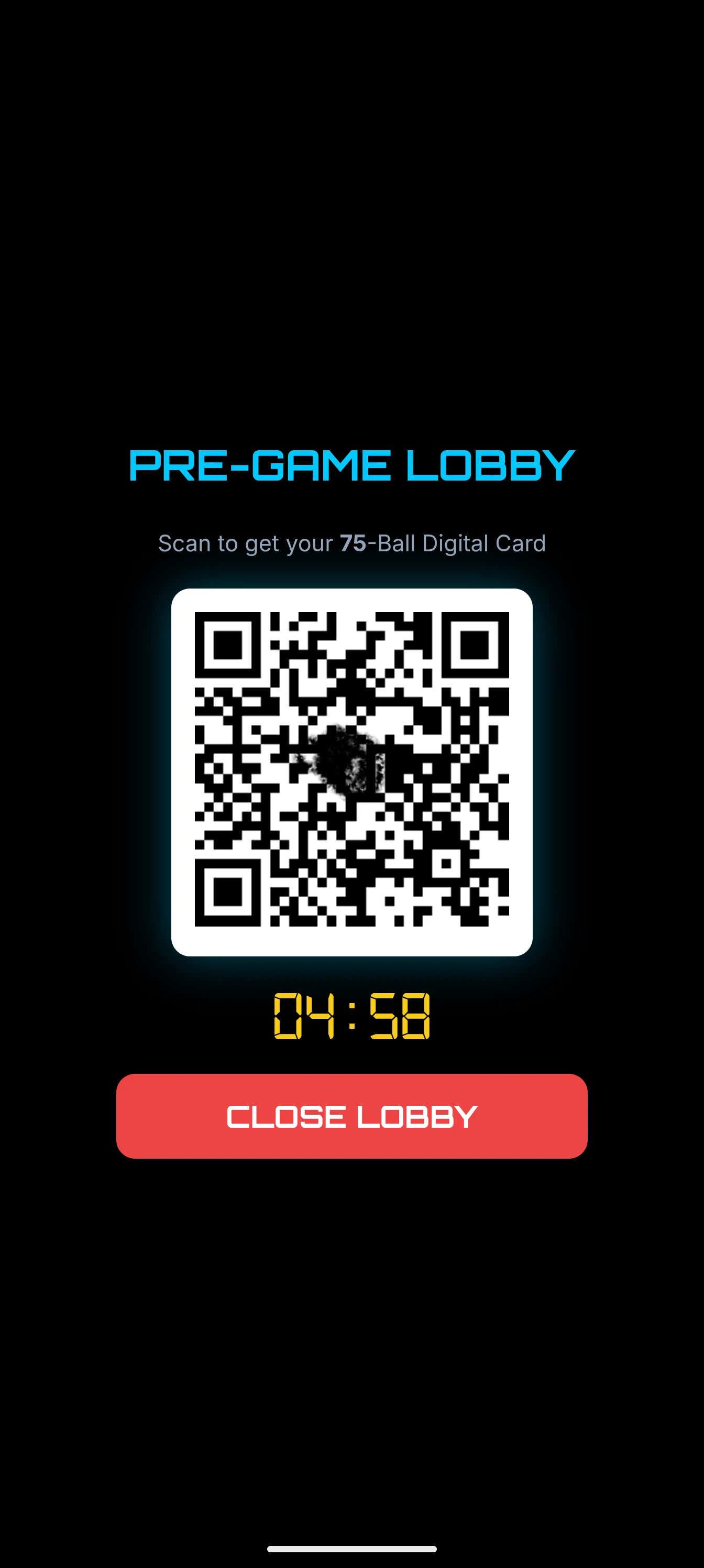
Forget wasting printer ink. You can display a "Pre-Game Lobby" QR Code on your TV, complete with a 5-minute countdown and lounge music. Guests simply scan it with their phones to receive digital, interactive Bingo Cards in their browser.
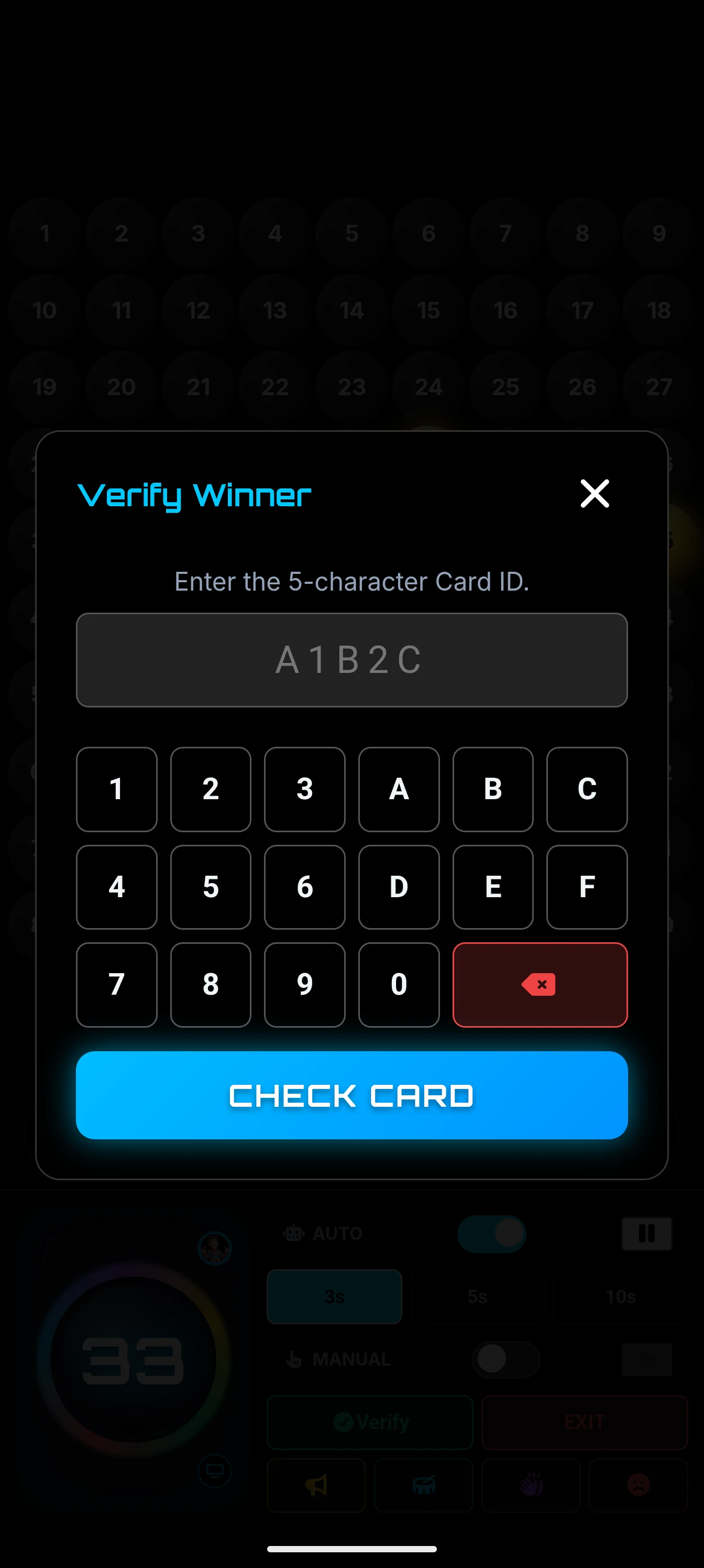
When someone yells "BINGO!", checking their ticket manually is stressful. Bingo Caller Pro solves this using an advanced `mulberry32` seed algorithm. Simply ask the player for their 5-character Card ID and type it into the app's Hex Keypad. The app instantly reconstructs their exact card on the TV screen, highlights the matches, and triggers confetti if they won. You can catch a false Bingo in under two seconds!
The Hype Deck Soundboard
Reward your winners and punish your losers! The app features a built-in soundboard. Did someone legitimately win? Blast the Airhorn or Applause buttons. Did someone make a false call and ruin the tension? Hit the "Aww" button to shame them playfully.
7. Fun Variations to Spice Things Up
If standard games get stale, try these proven variations to keep your guests on their toes:
- Speed Bingo: Use the "Auto Call" feature in Bingo Caller Pro and set the interval to 3 seconds. The panic is hilarious as players scramble to find their numbers.
- Death Bingo: Instead of playing to win, the *last* person to get a Bingo is the winner. Everyone else is eliminated as they complete their patterns!
- U-Pick 'Em: Instead of giving players pre-filled cards, give them a blank 5x5 grid. They write in their own lucky numbers from 1-75 before the game starts. It adds an element of personal strategy to the luck.
- Musical Bingo: Instead of numbers, create custom cards with song titles. Play 15 seconds of a song on Spotify, and players have to guess the song and daub it.
8. How to Organize a Charity Bingo Fundraiser
Bingo is one of the most profitable charity event formats. Because the overhead is so low, margins are incredible. Here is a quick checklist for a successful fundraiser:
- Check Local Laws: Most jurisdictions require a small, temporary raffle or gaming permit for charity bingo. Do not skip this step! Check your local state/county website for "Charitable Gaming Regulations."
- The Venue & Audio: Ensure the room has a TV or projector for the Bingo Caller Pro Display. Critically, hook your phone up to the PA sound system via Bluetooth or AUX so the automated Voice Caller can be heard over a crowded room of 200 people.
- Sourcing Prizes: Do not pay for prizes out of pocket! Reach out to local restaurants, spas, and businesses. They are usually thrilled to donate a $50 gift card in exchange for you announcing their business to your audience during the game.
- Selling Books, Not Cards: Don't just sell single games. Sell "Books" of 10 games at the door for a flat rate (e.g., $20 or $30). Use the custom pattern editor in the app to make each game progressively harder, starting with a simple "Line" and saving "Blackout" for the grand prize at the end of the night.
Frequently Asked Questions (FAQ)
Do I need internet to use Bingo Caller Pro?
No! The core Bingo Caller Pro app is 100% offline. It requires no Wi-Fi to generate boards, call numbers, or verify cards, making it perfect for community halls, church basements, and backyard parties with spotty reception.
Does the app have a monthly subscription?
Absolutely not. Bingo Caller Pro is a premium, pay-once, keep-forever app. There are no subscriptions, no hidden fees, no data collection, and zero advertisements.
What is a "False Bingo"?
A false Bingo happens when a player gets excited and yells "Bingo!" but has accidentally daubed a number that was never actually called. This is why having a Mastersheet or a Digital Ticket Verifier is mandatory for the host to check the board!
How do tie-breakers work in Bingo?
If two players yell Bingo at the exact same time on the exact same called number, you can have them draw the next number out of a bag (or use a random number generator on your phone). The player with the highest number takes the prize!
Does the phone screen go to sleep while hosting?
Free websites often let your phone screen turn off mid-game due to inactivity. Bingo Caller Pro uses "Wake Lock Technology" (which you can toggle in Settings) to keep your screen awake and active permanently while the game is running, ensuring the flow never stops.
The Final Verdict
Whether you are hosting a quick family game or a massive charity event, your tools dictate the experience. You can utilize our free web tools at Bingo.surf to get started. But if you want to eliminate all administrative stress, automate the complex math, and provide a visually stunning, ad-free Game Show experience on your TV, Bingo Caller Pro is the best investment you can make for your party.